The action button: automate a single record, at the right moment
Why and how to replace, with Pathta, an automation that reprocesses your entire database with a button that acts only on the record you are looking at.



Diane Huvent
October 26, 2026
5
MIN

The problem: recalculating everything to change a single row
In most business tools, automations work the same way. A scenario runs at regular intervals, goes through the whole table, compares the data and updates whatever has changed.
It works. But it is almost never what users want when they are working on a specific case. They want this record to be completed, recalculated or sent. Now.
The “scan everything” model has four drawbacks:
- It is slow. You have to wait for the next run, or let a long job grind through thousands of rows.
- It wastes resources. Every run touches rows that have not changed, which weighs on API quotas and costs.
- It increases the risk of errors. The more rows a job touches, the more data a single logic error damages at once.
- It takes control away from users. They choose neither the moment nor the record being processed.
The idea: reverse the logic
Instead of a scenario going out to look for work, the user triggers it. With one click, on the record they are viewing. And only that record is processed.
In practice, you add an action button to the record. The button contains no logic. Its only job is to tell the automation tool that there is something to do, and on which record.
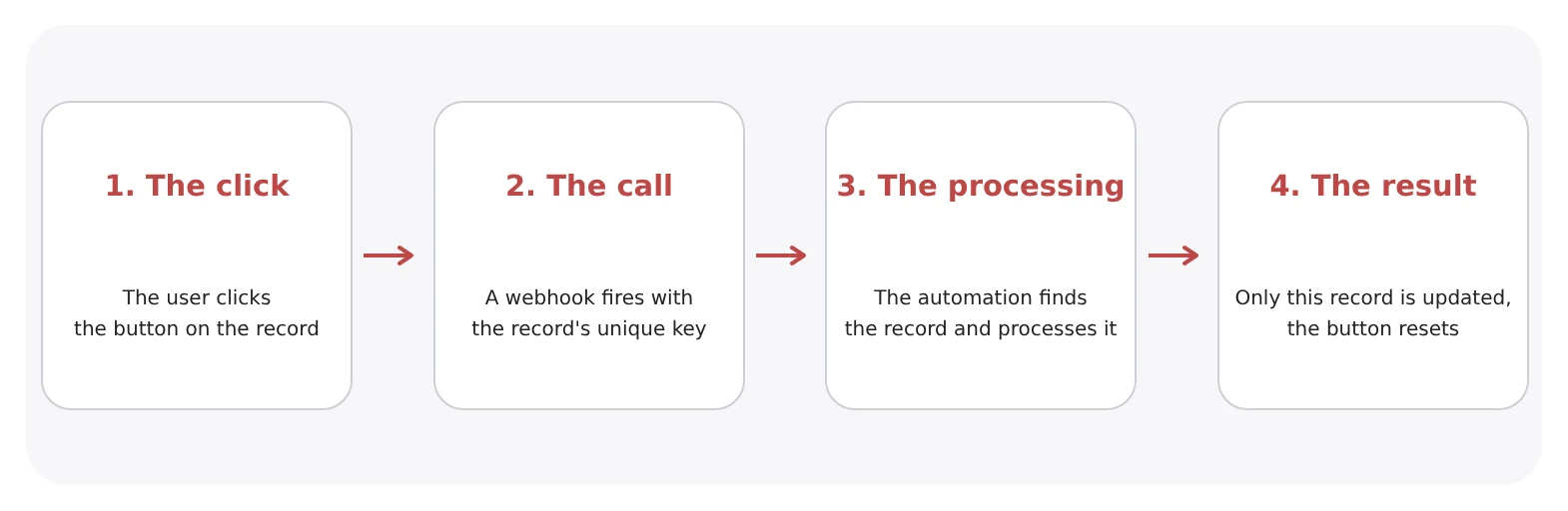
The four building blocks
1. A trigger in the user's hands
The button sits where the user works: on the record itself. Its label says what it does (“Complete the record”, “Update in Active Directory”, “Sync with the CRM”). One click is enough, with no waiting for a scheduled run.
Depending on the tool, the button can be a real button, a checkbox displayed as a button, or a field whose value change acts as the signal. The principle stays the same. As for the design, it is up to you.
2. A targeted call: the webhook
On click, the database calls a web address: a webhook. It is an entry point exposed by the automation tool, waiting to be called to launch a specific scenario.
The call carries two pieces of information, no more:
- which process to run, usually given in the address itself;
- which record to process, in the form of its unique key, sent in the message.
3. A unique key, and nothing else
This is the heart of the mechanism. The automation tool does not receive an entire table: it receives the identifier of a single record. A company registration number, an order number, a customer ID, a case reference, an employee number.
With this key, it no longer needs to look for what has changed. It knows exactly where to go.
4. Processing limited to that record
The scenario then always runs the same steps:
- find the record using the key received and read the relevant values;
- apply the business logic: query your Pathta path;
- write the result back to that record, and that record only;
- reset the button, so that the next click triggers the process again.
The rest of the database is never touched.
What you gain
- Immediacy. The result appears within seconds, while the user is still on the record.
- Efficiency. One click, one call, one row processed. Quotas and costs follow actual usage.
- Safety. An error can only affect one record, not the whole database.
- Adoption. Users stay in control of the timing and the scope. Automation becomes a tool they use, not a process they endure.
Use cases across every business function
The same mechanism meets very different needs:
- Enrich a record from an external source: company legal data, contact details, geolocation.
- Sync a single contact or a single order with a CRM, an accounting tool or an e-commerce platform.
- Recalculate a score, a KPI or a price on demand.
- Move a case forward: approve, notify a colleague, move to the next step of a process.
- Update an employee's record in Active Directory or their email signature.
Rules to follow
- Always reset the button. Otherwise, the next click will not trigger anything.
- Choose a truly unique key. A duplicate value would update the wrong record.
- One button, one action. Several clear buttons are better than a catch-all scenario.
What about scheduled automation?
It still has its place, which is why Pathta offers both modes. For bulk processing (nightly imports, monthly consolidation, consistency checks across the whole database), a scheduled scenario remains the best fit.
The right question is not “button or schedule?”, but “who decides when, and on what scope?”. When the answer is “the user, on one record”, the action button is almost always the right choice.
In short
A button on the record, a webhook carrying a unique key, processing limited to that single record. This simple mechanism works with most business databases and automation tools on the market. It makes your automations faster, leaner, safer and, above all, more natural for the people who use them.
Want to add this kind of automation to your tools? We help you identify the actions worth automating and put them in place. Contact us.
About the author: Diane Huvent is a project manager at Now-Code, a Bordeaux-based company specializing in data integration and a TimeTonic Platinum partner.
Toute l’actualité Now-Code
Nos réflexions autour du code, no-code et de la transformation digitale des TPEs et PMEs
Best practice
Timetonic
5
min
The action button: automate a single record, at the right moment
Why and how to replace, with Pathta, an automation that reprocesses your entire database with a button that acts only on the record you are looking at.

Airtable
Timetonic
Best practice
8
min
Migrating from Airtable to TimeTonic: challenges, pitfalls and a proven method
In short: migrating from Airtable to TimeTonic is not just a matter of exporting CSV files. You need to rebuild the data model, rewrite formulas, replace features that do not exist in TimeTonic (scripts, AI fields, interfaces), recreate automations and transfer attachments. In most cases, both tools also have to run side by side for several weeks. Now-Code, a Bordeaux-based TimeTonic Platinum partner, supports these projects and relies on its Pathta platform to migrate files and keep Airtable and TimeTonic in sync during the transition.


